
If you're running a platform that sends email on behalf of your customers (a blogging tool, a CRM, a booking app, etc.), you've probably hit this wall already: every new customer needs a handful of DNS records added to their domain before their mail will actually land in an inbox. A DKIM record here, a return-path (bounce) record there, maybe a tracking CNAME for good measure. Multiply that by a few hundred customers, and every customer who adds a DNS record pointing at some-esp.com is anchoring you to that email service provider. There may come a point where you have to send them an email that goes something like:
"Hi! We're switching email providers, so we need you to log into your DNS host and add these records. Let us know when you're done. Thanks!"
A few people will do it that afternoon. Someone will add the DKIM key as a CNAME and open a ticket saying your records are broken. Someone else will tell you the contractor who set up their domain left in 2023 and nobody knows the GoDaddy login. But most will just never get to it, and you'll be chasing them for months. Frankly, this is why a lot of platforms stay with an email service provider (ESP) long after they've stopped liking it.
There's a better pattern for this, and it's one we think more platforms should know about: delegate a subdomain via NS records, and manage everything underneath it yourself. Here's how it works, and why we're comfortable telling you about a technique that, frankly, makes it easier to leave us.
A quick refresher: DKIM and return-path
If you're not deep into email plumbing, here's the two-sentence version of what we're talking about:
- DKIM is a cryptographic signature added to outgoing mail, verified via a public key published in DNS. It proves the message wasn't tampered with in transit and that it was actually sent by whoever it claims to be from.
- Return-path (sometimes called a custom MAIL FROM or bounce domain) is the address bounces and delivery failures get sent to. Pointing it at a subdomain you control – instead of your ESP's shared one – is what lets SPF pass on an aligned domain, which mailbox providers care about a lot.
Both are set up via DNS records that your email provider generates and asks you to publish: typically a TXT record for DKIM, and a couple of CNAME records for the return-path (Helo asks for two, so it can keep your return-path aligned across multiple underlying delivery systems). Nothing unusual here. Every ESP works this way, us included.
The better approach: delegate a subdomain
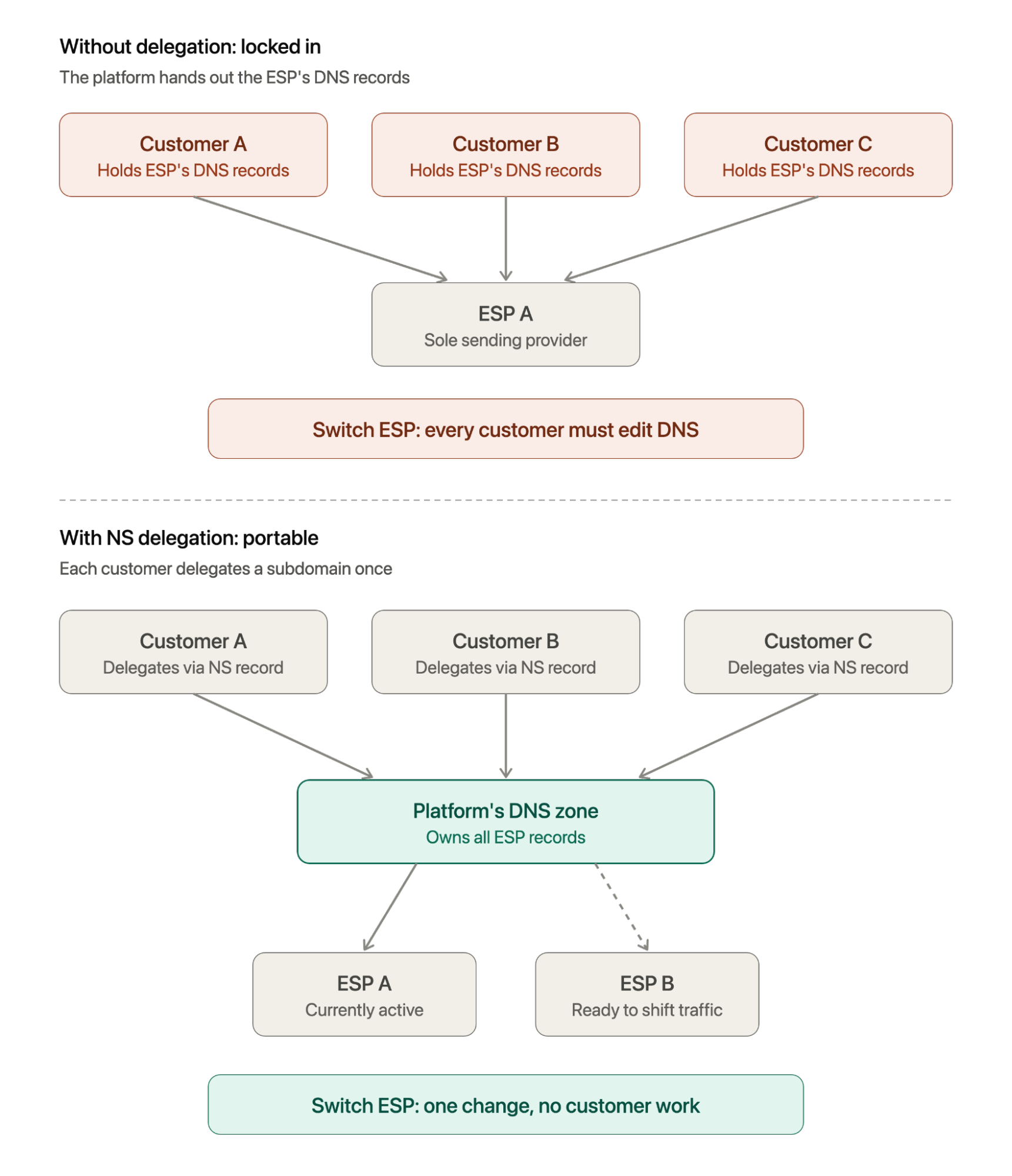
Instead of asking customers to add your ESP's specific records, ask them to do one thing, once: add NS records that delegate a subdomain (say, yourplatform.customerdomain.com) to nameservers you control.
That's it. One set of NS records, added one time. From then on, yourplatform.customerdomain.com is a DNS zone you fully control. You can add, remove, or change any record underneath it without ever going back to the customer.
One assumption baked into this: your customers need to be okay sending from a subdomain rather than their bare domain. Helo requires the domain you verify to exactly match the domain you send from, so you can't verify yourplatform.customerdomain.com and send from customerdomain.com. DMARC's relaxed alignment would technically allow a subdomain's DKIM signature to align with a From header on the parent domain, since alignment only cares about a shared organizational domain. Helo doesn't currently support that, though—the match must be exact. That's a non-issue for most platforms, but if a customer specifically wants to send from their root domain, this pattern isn't for them. They'd need to add records at the root domain directly instead, the old-fashioned way.
Honestly, even where this is technically possible elsewhere, it's usually not a great idea. Mailbox providers pay attention to the domain recipients actually see in the From line, not just whatever domain the DKIM signature is quietly attached to. That means a customer's root domain still takes the reputation hit (or gets the credit) for whatever goes out through your platform, and vice versa. Using a dedicated subdomain, and keeping it in the visible From address, is precisely how you avoid that bleed-through. An exact-match requirement, whatever its origin, nudges you toward the setup you'd probably want anyway.
While not perfect, sending from a subdomain also helps isolate your root domain's email reputation. If transactional, marketing, or automated platform emails experience deliverability issues or high complaint rates, keeping them on a dedicated subdomain protects your primary corporate domain from being flagged or blacklisted by mailbox providers. It’s generally a good practice to use separate subdomains for different purposes (e.g., news.example.com for marketing and notification.example.com for transactional).
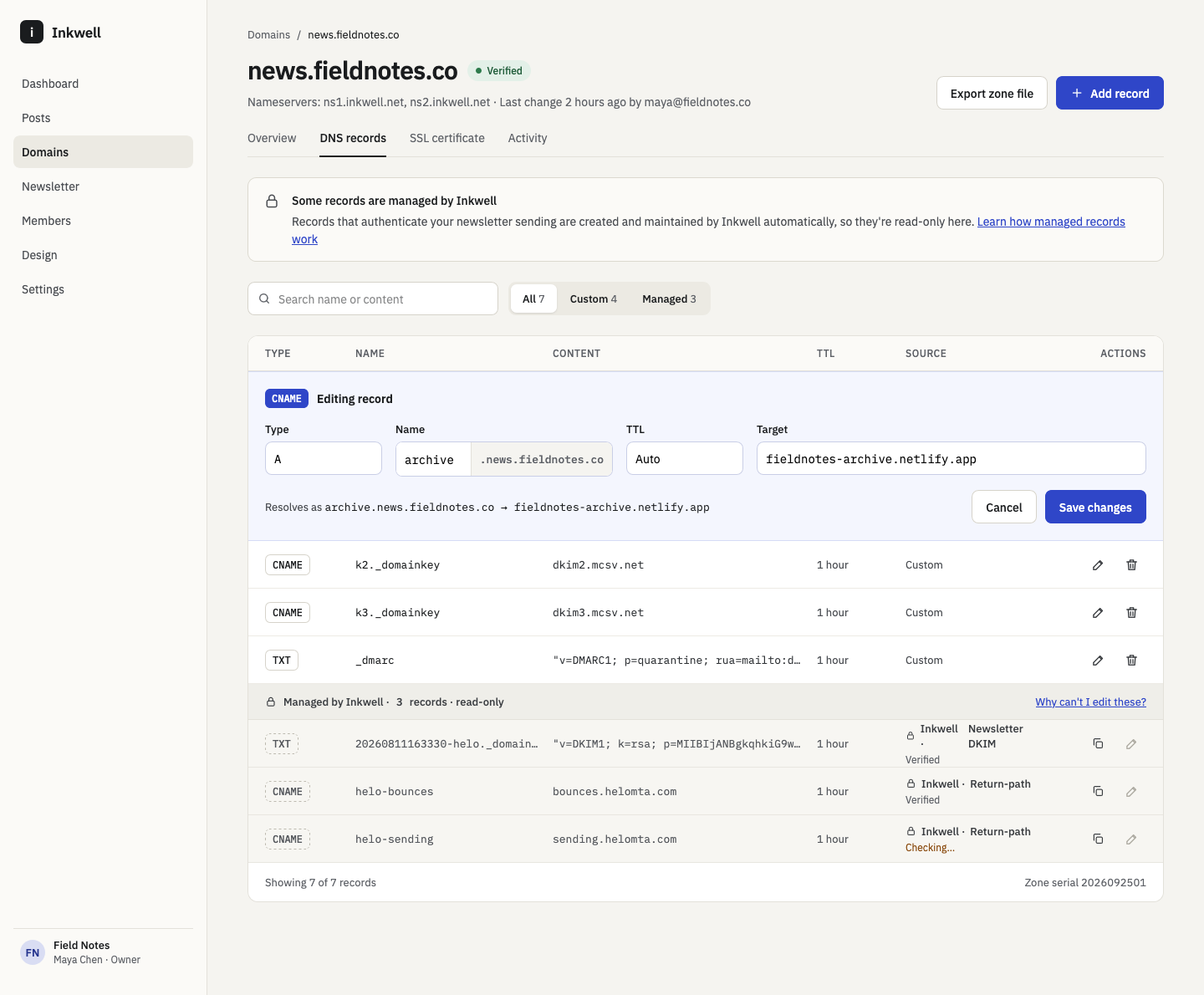
The subdomain also doesn't have to be yourplatform.customerdomain.com. It can be anything, including a subdomain your customer chooses. If you want to give your customers some level of control and visibility into the records you’re managing, you could create an interface in your platform for doing so. Below is a UI mockup of what that might look like:
Where to host the zones
You'll need a DNS provider with an API that can create a zone per customer. The details differ a bit by provider, but the goal is the same: give every customer the exact same NS records to add, so you can document them once and never look them up per customer.
Cloudflare is our recommended default. It supports custom (vanity) nameservers, so every customer's zone can be served from one consistent, on-brand set:
yourplatform.customerdomain.com.  NS  ns1.yourplatform.com.
yourplatform.customerdomain.com.  NS  ns2.yourplatform.com.
That looks a lot more trustworthy in your onboarding instructions than a pair of Cloudflare-branded hostnames, and it doesn't tie your customers' DNS to anyone else's brand. The catch: account-level custom nameservers require an Enterprise plan, or a Business plan after contacting Cloudflare Support. Without them, Cloudflare assigns each new zone its own pair of nameservers. That still works, but you'll have to show each customer the specific pair for their zone instead of one documented set.
If you're already on AWS, Route 53 works well too. Normally, every Route 53 hosted zone gets handed a random set of 4 nameservers. A reusable delegation set flips that around: you create one fixed set of 4 nameservers up front, then assign every new hosted zone to that same set. Every customer gets the same NS records to add, something like:
yourplatform.customerdomain.com.  NS  ns-1487.awsdns-57.org.
yourplatform.customerdomain.com.  NS  ns-406.awsdns-50.com.
yourplatform.customerdomain.com.  NS  ns-870.awsdns-44.net.
yourplatform.customerdomain.com.  NS  ns-1972.awsdns-54.co.uk.
Route 53 doesn't let you rename these to something like ns1.yourplatform.com, so you get consistent nameservers rather than vanity ones. That's a fine trade for plenty of platforms, and it's available on any AWS account without a plan upgrade.
The flow
Whichever provider you pick, it looks like this:
- Your customer tells you which domain they want to send from. Your backend creates a DNS zone for
yourplatform.customerdomain.comin Cloudflare or Route 53, before the customer adds anything, so the delegation never points at nameservers that don't know about the zone yet. - The customer adds the NS records (the same ones every time, if you're using custom nameservers or a reusable delegation set).
- Once the delegation has propagated (anywhere from a few minutes to a few hours), your platform creates a Channel and a Domain in Helo for that customer, scoped so their sending, stats, and reputation are isolated from everyone else on your account.
- Helo's Domains API hands you back the DKIM and return-path records that domain needs.
- Your platform writes those records into the zone via Cloudflare's or Route 53's API. No customer involvement required.
- Helo verifies the domain and fires a webhook when it's confirmed (or if verification ever fails), so your product can reflect real status back to the customer without polling.
Onboarding a customer's domain becomes a background job instead of a support ticket.
The part that's (actually) interesting
Here's the thing about owning that delegated zone: it's not just about onboarding UX. The everyday win is that routine changes stop involving your customers. If Helo asks you to rotate a domain's DKIM key, for example, you update the record in your zone through the API and nobody on the customer's side has to lift a finger.
The bigger win is that your customers' email deliverability is no longer wired directly to a specific ESP's DNS values. If you ever want to switch providers, run two in parallel, or move some traffic elsewhere, you update records inside a zone you control. Nobody emails their end customers. Nobody re-does DNS. It just changes on the next lookup.
Which, yes, includes switching away from us.
We're fine with that. It's kind of the point of how we think about this stuff. We'd rather you stay with Helo because the product and pricing are good than because untangling your customers' DNS from us would be an enormous project. If NS delegation makes us easier to leave, it also makes us honest about wanting you to stay for the right reasons.
DNS is not the whole migration
Owning the zone controls where the records point. It doesn't hand you the sending reputation built up on the other side of them, and that's worth being upfront about.
Inbox providers like Gmail and Yahoo don't trust a domain or IP just because DNS says it's allowed to send mail. That trust is earned gradually, based on how real recipients respond to mail actually sent from it over time. A domain or IP with no sending history that suddenly starts pushing out thousands of messages looks exactly like a spammer's setup: brand-new infrastructure at full volume. Inbox providers treat it that way regardless of how clean your DNS is.
So if you ever do move a customer from one ESP to another, updating the records is the easy part. You still need to warm up: run both providers in parallel for a stretch, and gradually shift volume over instead of flipping 100% of a customer's mail in one day, watching bounce and complaint rates the whole way. The good news is that NS delegation pairs nicely with doing this carefully. Since each customer's sending is already isolated (per Channel, if you're on Helo), you can migrate customers in staggered cohorts, prove deliverability on a handful before moving the rest, and never touch DNS again for any of them because it's already pointed where it needs to be.
NS delegation removes the DNS bottleneck: the part that used to mean a support ticket per customer, per record. It doesn't remove the reputation bottleneck. No DNS trick shortcuts that one; budget real time for warm-up regardless of who's doing the switching.
Worth the setup cost
Running your own delegated DNS zones per customer is more infrastructure than pasting a CNAME into a support macro. You need to set up custom nameservers (Cloudflare) or a reusable delegation set (Route 53) once, then automate zone creation through your provider's API. You'll also want to budget for per-zone costs (Route 53 charges a small monthly fee per hosted zone, and Cloudflare's pricing and zone limits depend on your plan), clean up zones when customers churn, and have a bit of patience the first time you debug an NS propagation issue. Each provider has a gotcha or two as well. On Cloudflare, for example, the return-path CNAMEs have to stay "DNS only" rather than proxied, and on Route 53 you'll need to split long DKIM keys into 255-character chunks.
But if you're a platform with more than a handful of customers, it pays for itself fast, both in onboarding friction you remove today and in flexibility you're glad you have later.
Wrapping up
Companies can retain customers in two ways. They can create genuine stickiness through product quality, customer support, reliability, integrations, building trust, or having fair pricing, to name a few. They can also create what I would call artificial stickiness, using underhanded methods like long-term contracts, early termination fees, sneaky auto-renewals, sunk-cost exploitation, making cancellations difficult, dark patterns, etc. While a bit of a gray area, DNS can create artificial stickiness.
Artificial stickiness is something I'd like to avoid, both as a consumer and business representative. I want customers of our product to continue using it for genuine reasons, and if they want to leave, for whatever reason, they should be able to.
We've written up a step-by-step guide, with API examples for both Cloudflare and Route 53, in our docs: Automate customer DNS with NS subdomain delegation. If you're building this out or have experience dealing with this particular issue in the past, we’d love to hear from you! Or is DNS zone management in Helo a feature you’d like to see? Drop us a line at support@helohq.com.